
Contents8 sections ↓
Series Roadmap: SuiteWorld 2026
SuiteWorld 2026 Announcements: What You Can Use Today
NetSuite SuiteSkills: What They Are and How to Use Them
Ask Oracle Connectors: NetSuite as an MCP Client, Explained
SuiteWorld 2026 Product Keynote: What Works Today
How to Roll Out Ask Oracle in NetSuite: A Plan in Four Steps
Ask Oracle is the AI assistant built into NetSuite. You can switch it on in the NetSuite version you use today, get it as part of NetSuite Next, or try it in a preview account. Turning it on takes a setting. Getting a finance team to trust it takes a plan. This guide puts together what NetSuite and one of its customers said about that at the SuiteWorld 2026 product keynote on October 27.
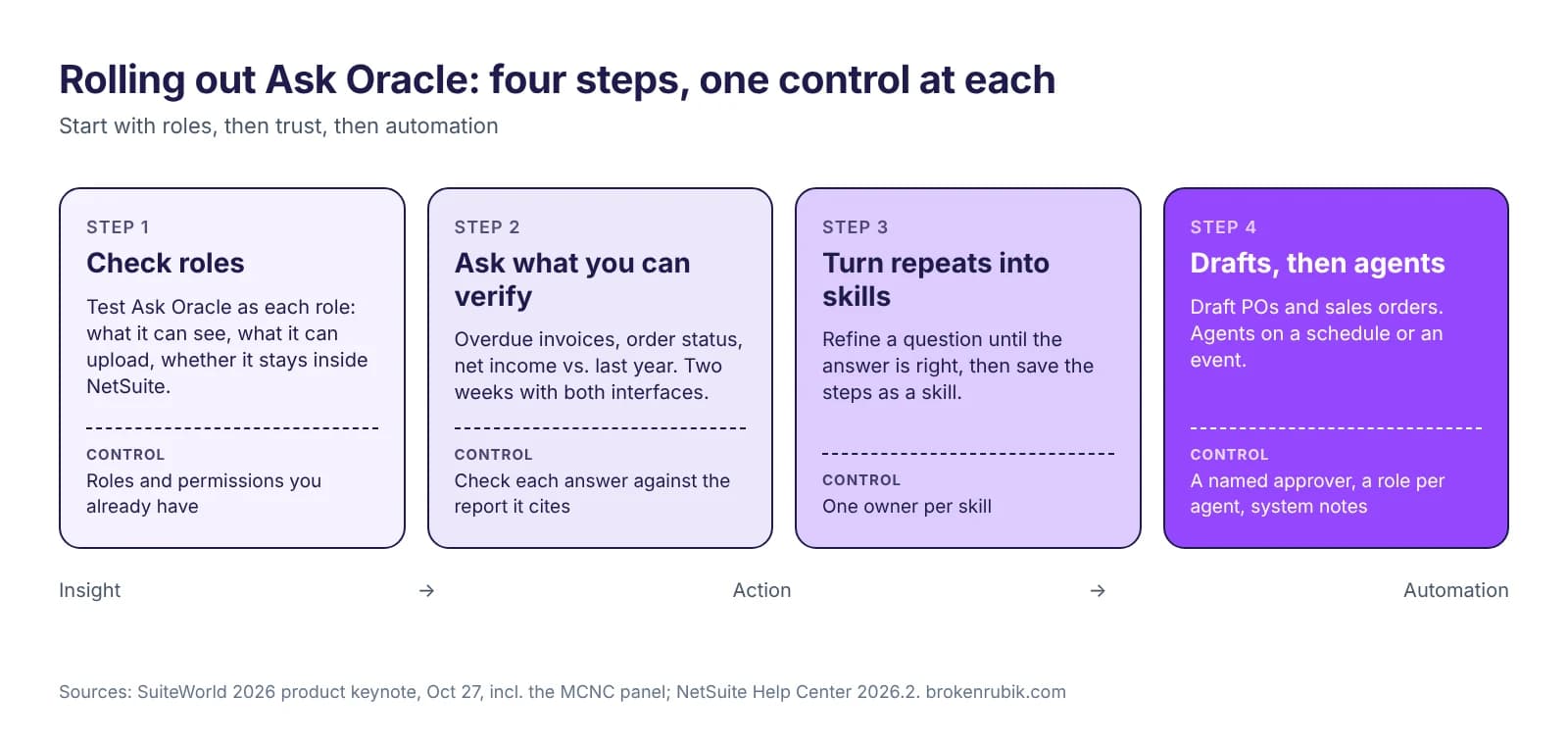
Direct answer: Roll out Ask Oracle in four steps. First, check roles: test the assistant as each role and confirm it cannot see what that role cannot see. Then start with questions your team can already answer, so they can check the answers. Next, turn repeated questions into skills. Last, let Ask Oracle prepare drafts and agents run in the background, with a named approver for each. At the keynote, NetSuite customer MCNC described doing the first two steps with a two-week period in which users could switch between the old and new interfaces.
Checked on October 30, 2026 against the SuiteWorld 2026 product keynote recording and the NetSuite Help Center.
Why a plan, and not just a switch
Oracle says more than 2,500 businesses had used Ask Oracle by September 2026, up from a few hundred in July. At the keynote, Brian Chess described what Oracle sees across those conversations. Oracle says it finds these patterns with AI, without reading individual chats. People start with questions they can answer themselves, such as which invoices are overdue or where an order stands. Once those answers hold up, the questions change: what is driving the cash shortage, which costs are squeezing margins, what needs a look before the close.
Chess put it as the progression a good analyst follows: what happened, why it happened, what needs attention, and what to do about it. He summed it up as insight first, then action, then automation. A rollout that follows that order builds trust step by step. One that starts with agents usually stalls at the first wrong answer.
Step 1: check roles before anyone asks a question
Ask Oracle runs with the permissions of the person using it. An agent runs with its execution role, the role you assign it. So the roles you already have decide what the AI can reach. We explained why that matters in part 1 of this series. Here is how one customer tested it.
Cooper, MCNC's NetSuite administrator, described three checks he and the security team ran before giving people access:
- Does it solve real business questions? They tested it on their own tasks, not on generic examples.
- Can a role see what it should not? He switched from role to role and tried to reach confidential data. He could not.
- Does it stay inside NetSuite? He tried to get it to pull information from the internet. It did not.
Add these to your own checklist:
- Uploads. Ask Oracle accepts PDF, Word, Excel, PowerPoint, image, CSV and text files. Oracle's Help Center says administrators enable uploads for specific roles and that users need file cabinet access. Decide which roles get it.
- Who builds what. In the keynote, creating saved searches and workflows through Ask Oracle was something an administrator approves, and permission to do it is assigned. Decide which roles get it before someone asks.
- Traceability. Since August 2026, system notes show when AI made a record change. Show your auditors where to look.
- Usage. In September the Help Center introduced NetSuite AI Units and a dashboard to track their use. Find out how your account counts them before usage grows.
Step 2: start with questions you can verify
Laura, from MCNC's finance team, started with budget-versus-actual variances and matching bills to purchase orders. Those were tasks she did every month, so she could tell straight away whether an answer was right. After that, she moved to areas where she was less sure.
Good first questions share three traits: someone on the team already knows the answer, a saved search or report already gives it, and the question comes up every week. For example:
- Which invoices are more than 30 days overdue?
- Where does this sales order stand?
- How does this year's net income compare to last year's?
Ask Oracle tells you which report or records it used, and can open the report with the same filters. Make that check a habit: compare the answer with the report your team already trusts.
MCNC's second move was the one we would copy. For two weeks, users could switch between the old interface and the new one. They ran their usual processes, then checked the result with Ask Oracle. Cooper said building that trust was what made the launch work. Sarah, MCNC's CFO, compared it to training a new employee: start with a real task, check the results, talk about it, adjust.
Step 3: turn repeated questions into skills
A skill writes down how your company does a task, so Ask Oracle follows the same steps every time without being told. The Help Center's October 2026 notes list a "skill creator" that builds private skills from files, requirements or a conversation.
Two examples from MCNC show when a skill pays off:
- Missing timesheets. With the payroll specialist out, Laura ran payroll. Her first question returned a long list that included people who no longer worked there. She refined it step by step, for example "exclude people with a termination date", until the list was right. Then she typed "create skill". Next time, the skill runs those steps for her.
- Transactions that standard reports handle poorly. Sarah set aside time with examples and worked with Ask Oracle until it read internal memos on transactions and found quantity variances. She said it needed less hand-holding than she expected.
Some rules for skills:
- One owner per skill. A skill is a process document that runs. When the process changes, someone has to update it.
- Start private, then share. Skills can be shared across teams once they give the same answer for more than one person.
- Write the exceptions down. Laura's skill works because it says who to leave out. Exceptions are what make an answer right.
Step 4: drafts, then agents, each with an approver
Ask Oracle can also prepare work. At the keynote it created a draft purchase order from a supplier quote and a draft sales order from a customer PO. It prepared a pricing rule for review, and it reassigned a project resource after approval. Approval workflows, scripts and business rules still apply when a draft is submitted.
Agents go one step further: they run in the background, on a schedule or on an event, and bring a person in when a decision is needed. In the demo, an agent checked for new hires every week and created POs for their equipment. It ran under a procurement role and could be switched off from the SuiteAgent Management Workspace in one click.
Before you get here:
- Name the approver for every type of draft: POs, sales orders, pricing rules, saved searches, workflows.
- Create a role for each agent. Don't reuse a person's role. Roles change when teams reorganize, and the keynote demo showed an agent failing for exactly that reason.
- Check availability. Oracle's October 26 press release lists SuiteAgent Studio and the Management Workspace for a future release, while the keynote showed them as available today. Confirm in your account. Our product keynote recap has the details.
Where Claude and ChatGPT fit
Not everyone will use Ask Oracle. The AI Connector Service lets Claude, ChatGPT and other assistants work with NetSuite data under the user's role. Oracle says more than 13,000 businesses have used it. In the keynote, Chess described both working together: ask a question in Claude in the morning, approve a recommendation in NetSuite in the afternoon, with the same data and permissions.
The rollout steps are the same for both. Roles first, verifiable questions next, then skills. SuiteSkills give external assistants the same kind of written procedure. See our SuiteSkills guide and how to connect NetSuite to Claude.
A two-week plan you can copy
| When | What | Who |
|---|---|---|
| Days 1-2 | Test Ask Oracle as each role that will use it: what it can see, what it can upload, whether it stays inside NetSuite | Administrator, security |
| Days 3-4 | Pick five questions per team that a report already answers | Team leads |
| Days 5-14 | Users work in both interfaces and compare Ask Oracle's answers with their reports | Finance and operations users |
| Day 10 | Write the first skill for a task that repeats monthly | One power user |
| Day 14 | Review: which answers people trust, which roles need changes, who approves drafts | Controller, administrator |
Want help with the role review?
We review NetSuite roles for AI, switch on Ask Oracle or the AI Connector Service in a sandbox, and write the first skills with your team.
Talk to our AI integration teamThis is part 5 of our SuiteWorld 2026 series. Part 4 is the product keynote recap, and part 1 covers the opening keynote's announcements.
What clients ask before signing
Sources
- SuiteWorld 2026 product keynote, "Ready for Now", October 27, 2026, including the MCNC customer panel, on SuiteWorld On Air (free registration)
- Oracle NetSuite, What's New in Ask Oracle, NetSuite Help Center (document uploads by role, skill creator)
- Oracle NetSuite, NetSuite 2026.2 release notes, September 21, 2026 update, NetSuite Help Center (system notes for AI changes, NetSuite AI Units)
- Oracle NetSuite, NetSuite Advances Vision for an Autonomous Suite, press release, October 26, 2026
Get your implementation scoped
Tell us your scale and timeline. We'll come back with a fixed-price scope within 48 hours.

Sebastian Correa
Co-Founder & CCO
Co-founder and Chief Creative Officer at BrokenRubik with 12+ years of experience in NetSuite consulting and e-commerce development. Specializes in helping businesses optimize their ERP operations and scale their online presence through strategic technology implementations.