
Contents6 sections ↓
Series Roadmap: SuiteWorld 2026
SuiteWorld 2026 Announcements: What You Can Use Today
NetSuite SuiteSkills: What They Are and How to Use Them
Ask Oracle Connectors: NetSuite as an MCP Client, Explained
Until now, MCP and NetSuite worked in one direction: an outside assistant such as Claude or ChatGPT connected to NetSuite through the AI Connector Service. Ask Oracle Connectors, announced at SuiteWorld 2026, add the other direction. NetSuite's own assistant goes out to the web and to the other systems your business runs on, and brings what it finds back into your work.
Direct answer: Ask Oracle Connectors let Ask Oracle, the assistant inside NetSuite Next, reach outside NetSuite. They make it an MCP client. MCP, the Model Context Protocol, is the open standard AI assistants use to connect to other software. With it, Ask Oracle will be able to search the internet, compare NetSuite data with your other business systems and start follow-up actions you are allowed to take. Oracle announced the connectors on October 26, 2026 for a future release, with no date. They work in the opposite direction to the AI Connector Service, which lets outside assistants into NetSuite and which more than 13,000 customers already use.
Checked on October 27, 2026 against Oracle's press release of October 26 and the SuiteWorld 2026 keynote recording.
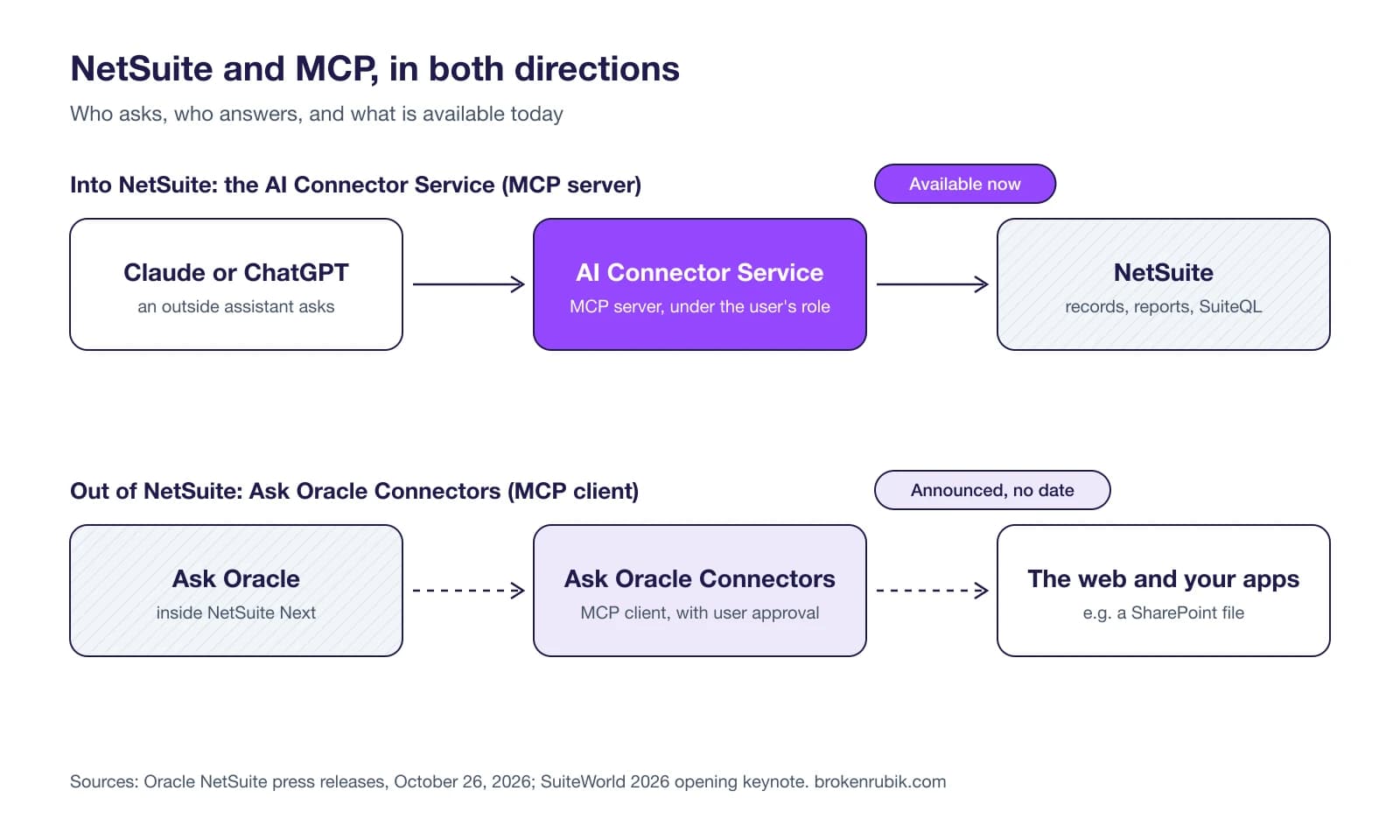
Two directions, two different products
| AI Connector Service | Ask Oracle Connectors | |
|---|---|---|
| MCP role | Server: NetSuite answers | Client: NetSuite asks |
| Who starts the conversation | An outside assistant (Claude, ChatGPT and others) | Ask Oracle, inside NetSuite |
| What it reaches | NetSuite data and actions, under the user's role | The web and other business systems |
| Status | Available; Oracle says 13,000+ customers use it | Announced for a future release, no date |
| Our guide | NetSuite MCP explained | This post |
The difference matters for who controls what. With the AI Connector Service, NetSuite decides what the outside assistant may see and do, through roles and permissions. With Ask Oracle Connectors, NetSuite is the one asking. What it can reach will then depend on the other system and, as in the keynote demo, on what the user approves.
What Oracle showed at the keynote
Goldberg said the connectors are coming soon and showed two short demos. These were product demos, so treat the numbers on screen as sample data.
A sales call. A salesperson asks Ask Oracle to prepare a first call with a new lead. Ask Oracle reads the lead's website, matches it with the company's own sales data in NetSuite, and returns a plan. The plan covers what to say, which products to pitch and which similar customers to mention.
A plan in a spreadsheet. A marketing user asks Ask Oracle to compare sales-order volume in NetSuite with the marketing team's projection, which lives in an Excel file on SharePoint. Before reading anything, Ask Oracle asks for permission to access SharePoint through MCP. The user can approve once, approve for the rest of the chat or deny, and the prompt notes that access means searching files, not changing them. The answer explains the gap and its knock-on effects on stock, fulfillment staff and cash.
The second demo is the more interesting one. As Goldberg put it, in many companies the forecast lives in a spreadsheet, the actuals live in NetSuite, and nobody notices the gap until it becomes a problem.
What Oracle has not said yet
The announcement is short, and these questions are still open:
- Which systems. The demo used SharePoint and the open web. Oracle has not published a list of supported connectors, or said whether you can register your own MCP servers, such as one for a custom app or a warehouse system.
- Authentication. It is not yet known how Ask Oracle signs in to the other system: as the user, with a shared account, or through an admin-approved app.
- Actions. Oracle mentions directing "permitted follow-up actions" in connected applications, with examples such as routing an approval, updating an order or holding a payment. It has not said which systems support which actions, or what logging there is on the NetSuite side.
- Governance. We don't know whether administrators can restrict which connectors each role may use, or where the data read from other systems is processed and stored.
- Availability and price. No date. In the keynote, Goldberg listed Ask Oracle, the AI Connector Service, SuiteSkills, AI Portlets, agents and NetSuite Next as included at no extra cost. The connectors were not on that list, and the press release does not mention pricing.
We will update this post when Oracle publishes documentation.
Connectors don't replace integrations
This is our view, not Oracle's. Ask Oracle Connectors are for questions and light, approved actions, made one conversation at a time. They are not a way to keep two systems in sync.
Orders flowing from Shopify into NetSuite, inventory going out to a marketplace, invoices posting to a bank: that is still integration work. It needs error handling, retries and a record of every transaction, which is what a platform such as Celigo or a SuiteScript integration is built for. A connector that reads a spreadsheet to answer a question is useful. A connector that writes sales orders because someone approved a chat message is not how you want your order-to-cash process to run.
In practice the two will sit side by side. Integrations keep the data in NetSuite current and reliable, and connectors answer the questions that need context from outside.
How to prepare
- List the systems people ask about. Which questions in your company need NetSuite plus something else? The CRM, the planning spreadsheet, the e-commerce platform, the warehouse system, the shared drive. That list is your first set of connector candidates.
- Check which of them have an MCP server. Many SaaS vendors now publish one, others don't. Where there is none, the data may need an integration into NetSuite first.
- Decide who gets it. Start with a few roles whose questions cross systems, such as finance or sales operations. Don't turn it on for everyone at once.
- Write down what an assistant may not do. Examples: no writes to the ERP from a chat, no reading folders with HR files, approvals per chat rather than permanent. These rules are easier to agree on before the feature arrives.
- Keep the AI Connector Service in place. The inbound direction is available today. If your team already works in Claude or ChatGPT, see our Claude setup guide and the SuiteSkills that run on top of it.
Mapping which systems should talk to NetSuite?
We build NetSuite integrations and MCP connections, and we can tell you which questions need a connector, which need an integration and which need cleaner data first.
Talk to our integration teamThis is part 3 of our SuiteWorld 2026 series. Part 1 sorts everything announced at the keynote; part 2 explains SuiteSkills.
What clients ask before signing
Sources
- Oracle NetSuite, NetSuite Advances Vision for an Autonomous Suite, press release, October 26, 2026
- Oracle NetSuite, NetSuite Introduces SuiteSkills to Give AI Comprehensive Business Expertise, press release, October 26, 2026 (AI Connector Service adoption figure)
- SuiteWorld 2026 opening keynote, "Ready for Next", Evan Goldberg, October 26, 2026, on SuiteWorld On Air
Get your integration scoped
Tell us what systems you need to connect. We'll recommend the right approach and ballpark the cost.

Sebastian Correa
Co-Founder & CCO
Co-founder and Chief Creative Officer at BrokenRubik with 12+ years of experience in NetSuite consulting and e-commerce development. Specializes in helping businesses optimize their ERP operations and scale their online presence through strategic technology implementations.