
Contents9 sections ↓
When a SuiteScript needs to remember something between runs, the usual options are a custom record, a file in the File Cabinet, a script parameter, or N/cache for data that can disappear. In practice, integration checkpoints, retry queues and job state often end up as custom record types nobody else ever looks at. NetSuite 2026.2 adds another option built for that kind of data.
Direct answer: N/dataStore is a SuiteScript 2.1 module, documented in the November 2026 monthly release for NetSuite 2026.2, that stores JSON documents in named collections without creating custom records. It offers insertOne, insertMany, find, findOne, updateOne, updateMany, deleteOne and deleteMany, all asynchronous and server-side only. Queries use MongoDB-style operators such as $and, $or, $in, $lt and $exists, and updates support only $set, $unset and $inc. Each document can be up to 10 MB. findOne and single-document writes cost 2 usage units; find and multi-document writes cost 10. Storage is shared by all non-SuiteApp scripts in the account, while each SuiteApp gets its own. Oracle says not to store sensitive data in it, and it is not supported in scripts installed through SuiteBundler.
Checked on November 25, 2026 against Oracle's N/dataStore help topics.
How it is organized
Three levels, from the outside in:
- Data store.
dataStore.getDatastore(id)returns one. Most scripts never call it, becausedataStore.getCollection(id)uses the store nameddefault. - Collection. A named group of documents, like a table without a schema.
getCollection('checkpoints')is the same asgetDatastore('default').getCollection('checkpoints'). Neither call costs usage units. - Document. A JSON object. NetSuite generates its
_idon insert, so you must not send one.
Identifiers for stores and collections are 1 to 64 ASCII characters (letters, digits, underscores, dots, hyphens) and are case-insensitive.
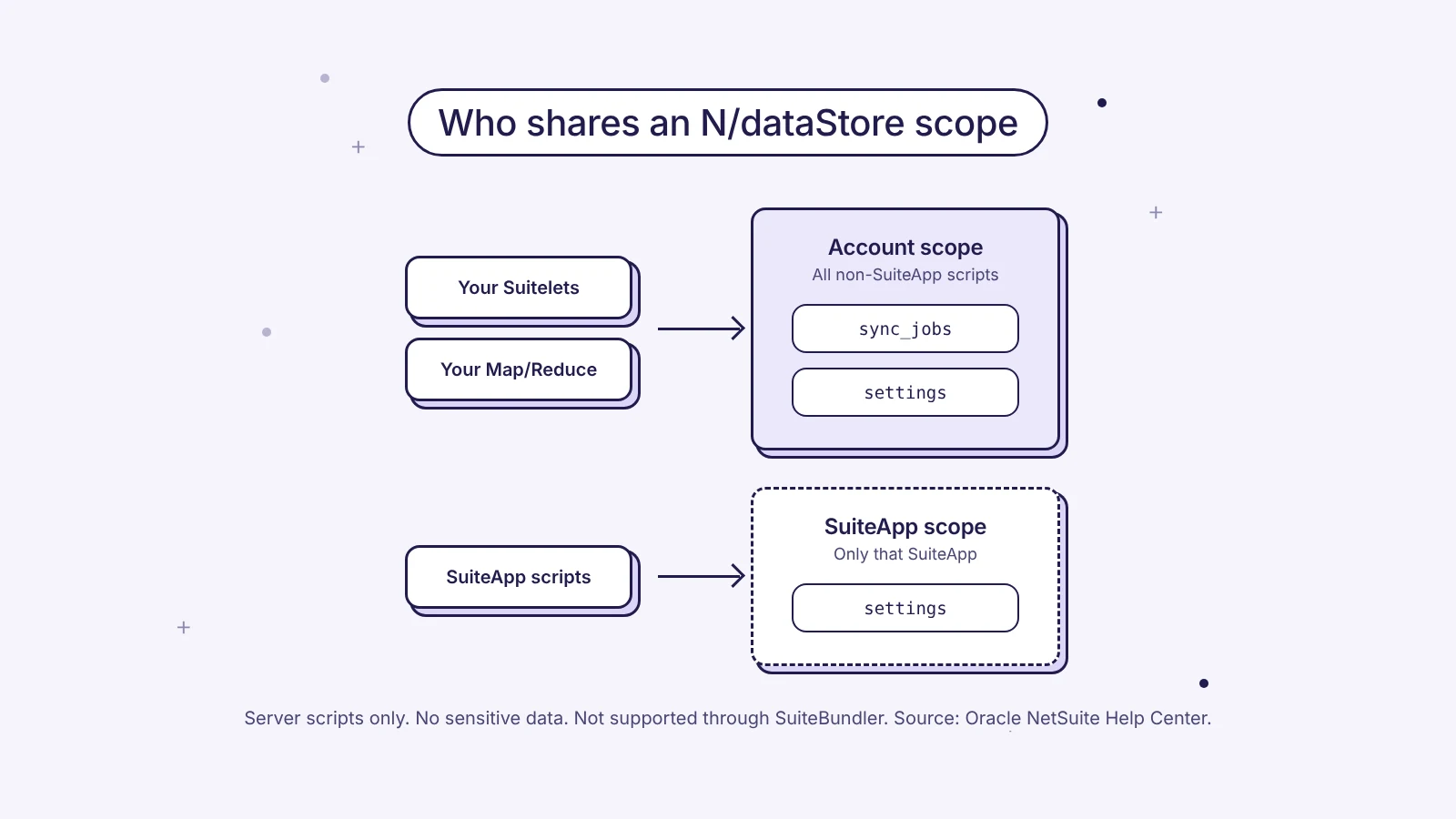
Who sees what is decided by the script, not by a parameter. In Oracle's words, "the executing script determines which storage scope the API uses." Every script that is not part of a SuiteApp shares the account scope. Scripts in the same SuiteApp share that SuiteApp's scope, separate from the account and from other SuiteApps. In practice this means a collection called settings written by your own scripts and one written by a vendor's SuiteApp never collide, and a SuiteApp cannot read your data through this module.
A first example
This Suitelet stores a sync checkpoint and reads back everything still pending. It uses only methods and result properties shown in Oracle's documentation.
/**
 * @NApiVersion 2.1
 * @NScriptType Suitelet
 */
define(['N/dataStore'], (dataStore) => {
  async function onRequest(context) {
    const jobs = dataStore.getCollection('sync_jobs');

    // 2 usage units
    const inserted = await jobs.insertOne({
      source: 'shopify',
      status: 'pending',
      attemptCount: 0,
      lastCursor: '2026-11-25T10:00:00Z'
    });

    // Read every pending job with fewer than 3 attempts
    const cursor = await jobs.find({ status: 'pending', attemptCount: { $lt: 3 } });
    const pending = [];
    for await (const result of cursor) {
      pending.push(result.document);
    }

    // 2 usage units: mark it running and count the attempt
    await jobs.updateOne(
      { _id: inserted.insertedId },
      { $set: { status: 'running' }, $inc: { attemptCount: 1 } }
    );

    context.response.write(JSON.stringify({ id: inserted.insertedId, pending: pending.length }));
  }
  return { onRequest };
});
Three things to notice. Every collection method returns a Promise, so the entry point is async. find returns a cursor you walk with for await; NetSuite fetches results in groups of up to 100 documents or 10 MB, whichever comes first, and gets the next group as you iterate. And updateOne and deleteOne act on the first match ordered by _id, so filter by _id when you mean one specific document.
Queries
A query is a plain object. Properties are combined with AND, an empty object matches every document, and property order does not matter.
| You want | Write |
|---|---|
| Exact match | { status: 'pending' } |
| Comparison | { attemptCount: { $gte: 0, $lt: 3 } } |
| One of several values | { tier: { $in: ['gold', 'platinum'] } } (up to 100 values) |
| Field present or missing | { errorMessage: { $exists: true } } |
| Nested field | { 'profile.country': 'ES' } |
| OR across fields | { $or: [ { priority: 'high' }, { attemptCount: { $lt: 3 } } ] } |
The rules that will trip people up, all from Oracle's query rules page:
- Types must match. The string
"5"does not match the number5. If one script writes IDs as strings and another as numbers, queries will silently miss documents. - Strings are case-sensitive.
'Pending'is not'pending'. - Null is not missing. A query for
nullmatches fields that are null, not fields that do not exist; use$exists: falsefor missing. And, in Oracle's words, a condition using$ne: null"doesn't match any field value", so do not use it to find non-null fields. - Dates are strings. They are stored and queried as ISO 8601 UTC strings, so store them that way and compare them as strings.
- No whole-object comparisons, no array indexes in paths, and no nested
$elemMatch.
A query can have up to 300 operators, field paths up to 32 segments and 256 bytes, and string literals up to 4,000 bytes.
Updates
Only three update operators exist: $set, $unset and $inc. Each operator needs a non-empty object, each property can be targeted by only one operator per update, and _id cannot be changed. $inc requires the property to already exist as a number.
There is no $push for arrays. To append to an array, read the document, change it in the script and $set the whole array, and accept that two scripts doing this at the same time can overwrite each other.
Limits and governance
| Item | Limit |
|---|---|
| Document size | 10 MB of JSON, excluding _id |
insertMany batch | 10 MB combined |
| Property name path | 4,000 bytes |
| Numbers | 0, or absolute value from 1e-130 to below 1e126 |
$in values | 100 per operator |
| Operators per query | 300 |
| Script types | Server scripts only |
| Method | Usage units |
|---|---|
getDatastore, getCollection | None |
findOne, insertOne, updateOne, deleteOne | 2 |
find (initial retrieval), insertMany, updateMany, deleteMany | 10 |
Oracle's pages do not state a maximum number of documents per collection or a total size per store, and find is priced per "initial retrieval" without saying whether fetching later groups of results costs more. Until they do, we would not design anything that depends on a collection growing without bound.
The Many methods are the efficient path for bulk work: 10 units whether you touch 2 documents or 200. Each Many call is all-or-nothing, with no partial success. Separate calls are not a transaction, though: if your script inserts and then the next update fails, the insert stays.
Errors you must handle differently
Two errors mean "it may have worked," and Oracle is explicit that you should not retry blindly:
DATA_STORE_OUTCOME_UNKNOWN: the operation may have been saved. Check before retrying.DATA_STORE_COMMITTED_RESULT_UNAVAILABLE: it was saved, but the result did not come back. Do not retry.
This matters most with $inc. A retry after an unknown outcome can count the same attempt twice. If a counter has to be exact, write a unique key with the change (for example the source transaction ID) so the script can check whether it already ran.
Also worth catching: DATA_STORE_NOT_ENABLED (the module is not enabled in the account), DATA_STORE_BUNDLE_NOT_SUPPORTED (the script came from a bundle) and DATA_STORE_LOCK_TIMEOUT (another operation held the document; Oracle confirms the change was rolled back, so it can be retried).
N/dataStore or a custom record?
| N/dataStore | Custom record | |
|---|---|---|
| Setup | None; collections exist when you use them | Record type, fields, permissions, often an SDF object |
| Shape | Any JSON, nested objects and arrays, up to 10 MB | Fixed fields, defined in advance |
| Who can see it | Scripts, through the module | Users, roles, saved searches, SuiteQL, workflows |
| Isolation | Per account or per SuiteApp, automatic | Controlled by role permissions |
| Sensitive data | Not allowed, per Oracle | Supported, with field-level controls |
| Deployment | SDF or Copy to Account, not SuiteBundler | Any method |
The help topics describe access only through the module; we found no mention of saved searches, SuiteQL, workflows or a UI for these documents. That defines where it fits.
Use N/dataStore for state that only code reads:
- Integration checkpoints and cursors (the last order synced, the last page fetched).
- Retry and work queues with a status and an attempt count, as in Oracle's own examples.
- Configuration for a script or SuiteApp that changes more often than a deployment parameter should.
- Cached, non-sensitive responses from external APIs, such as exchange rates or carrier service lists.
- Intermediate results of a Map/Reduce job that needs to hand off something bigger than a parameter.
Keep custom records for anything a person needs:
- Data users review, edit, approve or report on.
- Anything with personal, financial or credential data.
- Records that workflows, saved searches or other integrations read.
- Data an auditor may ask to see in NetSuite.
A common mistake will be using N/dataStore to avoid the work of designing a custom record that should exist. If the business would ever ask "show me the list," it belongs in a record.
Before you use it in production
- Check how the script is deployed. It will fail in scripts installed through SuiteBundler, and Oracle warns that an SDF script can fail if it is later installed as part of a bundle. Oracle's suggested routes are Account Customization Projects or Copy to Account.
- Name collections deliberately, with a prefix per integration (
shopify_,celigo_), because every non-SuiteApp script in the account shares the same scope. - Pick one type per field and convert at the edge. Most query bugs will come from mixed strings and numbers.
- Plan cleanup. Use
deleteManywith a date filter in a scheduled script so collections do not grow forever; remember that an empty query{}deletes everything. - Handle the two "may have been saved" errors explicitly before shipping anything that retries.
If you are moving older scripts to 2.1 to use it, our SuiteScript 2.1 migration guide covers the rest of the move, and the NetSuite November 2026 update lists what else shipped with it. For the full picture of NetSuite APIs, see the developer API guide.
Rethinking how your scripts store state?
We review SuiteScript and integrations for governance, retries and data design, and move what belongs out of custom records without breaking what users rely on.
Talk to a SuiteScript developerWhat clients ask before signing
Sources
All read on 25 November 2026 on docs.oracle.com.
- Oracle, N/dataStore Module
- Oracle, dataStore.Collection and dataStore.Document
- Oracle, Data Store Query Object and Data Store Query Rules
- Oracle, Data Store Update Rules and Limits
- Oracle, dataStore.Cursor
- Oracle, N/dataStore Script Samples
- Oracle, November Monthly Release for NetSuite 2026.2

Lucia · BrokenRubik
Replies by email within 24 hours

Lucia
Not sure which modules you need? Tell us what your team does today and we'll reply with the modules that cover it.

Gustavo Cañete
Co-Founder & Development Director
Co-founder and Development Director at BrokenRubik overseeing technical excellence and development operations. 12+ years of experience leading NetSuite development teams and delivering complex enterprise solutions.