
Contents10 sections ↓
A technician walks into a boiler room two floors below grade. There is no cell signal, no Wi-Fi, and a 47-field inspection form waiting on their phone. The result has to land on a NetSuite Job by end of day.
The usual answer is to build a backend with Postgres, an admin UI for ops to review submissions, a sync worker that reconciles back to NetSuite, and a back-office role to handle the inbox. We didn't. We shipped the PWA in about a week, on the order of 30 engineering hours, with NetSuite as the only datastore.
This post is how it works, what we deliberately didn't build, and where the pattern stops applying.
The setup
The client sells and maintains industrial boilers. Field techs visit sites, run an inspection, and the result has to attach to a NetSuite Job. Dispatch and back office already live in NetSuite; they did not want a second tool to log into.
The hard requirements:
- The app has to work offline. Most inspections happen in basements with no signal.
- Submitted forms have to end up on the right NetSuite Job, with photos in the File Cabinet.
- Ops administers everything from NetSuite: who can log in, what forms exist, what fields a form has.
What shipped: a web app that installs on the tech's phone like any other, a small middleware that talks to NetSuite, and a NetSuite SDF package that holds the custom records, the technician role, and the small script behind it all. The whole NetSuite side is one deployable unit, not a stack of items someone clicked into NetSuite by hand.
What we deliberately didn't build
This is the load-bearing part of the post, so it gets its own section.
No database. Nothing to stand up, nothing to back up, nothing to keep in sync with NetSuite later. Every read and every write lives in NetSuite, in custom records built for this app. If NetSuite is briefly offline, the phone holds onto submissions and sends them when it comes back.
No admin panel. There is no second tool for ops to log into. The admin is NetSuite. Adding a technician is creating a row in NetSuite. Reviewing a submitted inspection is opening the form on the Job, right next to the rest of that customer's history. Your dispatch team already knows where to click.
No back-office headcount. The data lands clean, attached to the right Job, with the photos already filed. No one re-types anything. No one reconciles a separate inbox of submissions against NetSuite at the end of the day.
No third-party login system. No Auth0, no Okta, no separate user database. Technicians live in NetSuite. Their login is verified against NetSuite, and the secure session the app stores on the phone lasts 30 days, so a tech who logged in last month at the shop can still open the app today in a basement and submit forms without seeing a login screen.
The list of things we didn't build is longer than the list of things we did. That accounts for most of the week we saved.
How it actually works
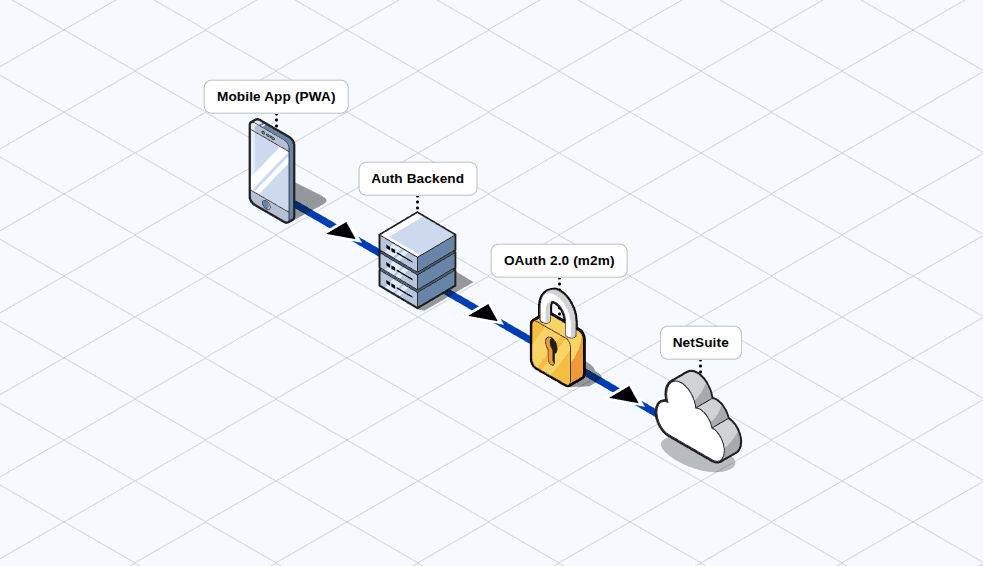
The flow on a job:
- The tech logs in once, anywhere with a connection (Wi-Fi or cellular). The login is verified against NetSuite and the phone gets a secure session that lasts 30 days.
- They drive to a site with no signal. The app still opens, with their assigned jobs and the right forms ready to fill.
- They run the inspection. Photos attach. The submission is held on the phone, marked as not-yet-sent.
- Signal returns. Pending submissions sync in the background. Each one writes the form to NetSuite, uploads the photos, and links everything to the right Job.
- Dispatch opens the Job in NetSuite and sees the submitted form with all its photos. No inbox, no triage queue, no other system to check.
Two things took the longest to get right. The phone never loses a submission, even when the network goes flaky mid-upload or NetSuite is briefly unreachable. And forms are defined once and used by both the phone and the server, so adding a new field or renaming one is a single edit, not a project that touches three places.
What replaced what
Here is the side-by-side of what a standard SaaS-style build would have shipped versus what we shipped:
| Standard build | What we built instead |
|---|---|
| A separate database with schema and migrations | NetSuite custom records, packaged once and re-deployable |
| A third-party login system with its own user database | NetSuite is the user system |
| A custom admin panel for ops | NetSuite is the admin panel |
| A background worker reconciling app data with NetSuite | Submissions write straight to NetSuite |
| A separate file store for photos | NetSuite File Cabinet |
| A back-office role to triage submissions | Nobody. Submissions land on the right Job |
| A hand-rolled NetSuite connector with custom auth | Our @brokenrubik/netsuite-sdk over OAuth 2.0 machine-to-machine |
Each row on the right is a thing we did not have to design, build, host, monitor, patch, or hand off. That is where the week comes from.
Why this took a week instead of a month
Most of the time on a NetSuite-connected app gets eaten by two things: standing up the secure connection to NetSuite, and writing the deployment workflow for everything inside NetSuite. We had both already.
Our @brokenrubik/netsuite-sdk handles the modern OAuth 2.0 machine-to-machine auth so the app has its own secure NetSuite identity with no human passwords moving through the stack. And the NetSuite side (the custom records, the technician role, the small script that handles login) is bundled into an SDF package: NetSuite's own deployment format. We can re-deploy the same setup into a sandbox or another NetSuite account in minutes, and we can change a field on a record by editing the package and re-deploying, not by clicking through screens and hoping nothing drifts.
Neither of those is exotic. Both of them, written from scratch on every project, are easily a week.
Where this pattern holds, and where it doesn't
Honesty section. The "no database, one-week build" answer is real, but it isn't free.
It works when:
- Your data model fits in NetSuite custom records, or is already there. Forms, inspections, work orders, time entries, surveys, simple ticketing.
- Your write volume is human-paced. A few hundred form submissions a day is comfortable. Thousands per second is not.
- Admin actions belong in NetSuite anyway. If ops already lives there, you save the second login. If ops lives elsewhere, the pattern leaks.
- You can tolerate SuiteTalk REST rate limits and governance units. We have not hit them; an app sending continuous webhooks would.
It breaks when:
- You need full-text search, geospatial queries, or analytics joins NetSuite can't answer fast. You can add a cache, but the moment you add a cache you have a sync problem.
- You need fine-grained per-user permissions that don't map to NetSuite roles.
- You need real-time push (websockets, live dashboards). NetSuite is a fine database. It is not a fine event bus.
- The data is high-volume telemetry. NetSuite is not where you put 10k IoT readings per minute.
We took on this build because the requirements sat squarely in the first list. If yours sit in the second, the pattern doesn't apply, and we'll tell you so on the first call.
What is an offline-first PWA for NetSuite?
A Progressive Web App that installs on a phone like a native app, caches its shell and data in the browser, and keeps working when the network drops. "Offline-first" means writes are accepted locally and queued for sync; the user never sees a "no connection" error during normal work. "For NetSuite" means the eventual destination is a NetSuite record (custom record, transaction, or native record), reached through SuiteTalk REST or RESTlets behind some authentication layer.
The combination is rare in NetSuite-land because the obvious paths (SuiteCommerce, SuiteApps, Suitelets) are server-rendered and assume connectivity. A PWA sidesteps that and lets you ship mobile field workflows without writing native iOS or Android, while still treating NetSuite as the only system of record.
Why this matters past one app
Most "small NetSuite custom app" projects we see are quoted in months and staffed with a backend dev, a frontend dev, and a NetSuite developer. The default plan includes a database the client now has to operate, an admin panel the client now has to learn, and a back-office workflow to handle whatever fell through the cracks.
Strip those out and the cost structure changes. The two-month estimate becomes a one-week POC. The ongoing maintenance becomes "the same NetSuite role you already manage." The back-office headcount line item disappears.
That is the version we'd rather build, and the version most field-service, inspection, and work-order scenarios can actually use. We won't promise a week for every project. We will promise that if your requirements look like the "it works when" list above, we'll quote you the small version first and only escalate if a real constraint forces it.
FAQ
What clients ask before signing
Where else this pattern fits
The same shape works for any team that does real work away from a desk and needs the result in NetSuite, without standing up a separate system in the middle. A few we've quoted or built:
- Warehouse app on a tablet. Pickers and put-away staff scan items in the aisles, post inventory adjustments and transfers straight into NetSuite. Holds up in the corners of the warehouse where Wi-Fi drops out. (Oracle's native option for standard pack/ship is NetSuite Ship Central — we build custom when its out-of-the-box flow doesn't fit.)
- Sales reps at client sites. Cached price lists and inventory on the rep's phone. They take the order in the client's office, and the sales order lands in NetSuite as soon as they walk back to signal.
- Delivery and proof-of-delivery. Driver captures a signature and a photo at the door; the fulfillment updates on the linked sales order when the truck reconnects.
If your team's workflow looks like one of these, this is the cheapest credible version. Start here. Add complexity only when a specific requirement forces it.
If you want a second opinion on whether your case fits the "it works when" list above, tell us about the workflow and we'll send back a one-page scope with a real estimate.
Get your custom work scoped
Share what you need built. We'll come back with a fixed scope and approach within 48 hours.

Joaquin Vigna
Co-Founder & CTO
Co-founder and Chief Technology Officer at BrokenRubik with 12+ years of experience in software architecture and NetSuite development. Leads technical strategy, innovation initiatives, and ensures delivery excellence across all projects.